
Geospatial 🌍#
Geospatial data is time based data that maps to a location on Earth. PVDeg supports single site and geospatial analyses using meteorological and solar radiation data, such as Typical meteorological year (TMY) data. This can be used to extrapolate the perfomance of PV systems over many years beacause it is statistically representative of weather conditions given a typical year. PVDeg collects an arbitrary amount of location specific meteorological and solar radiation data to run geospatial analyses.
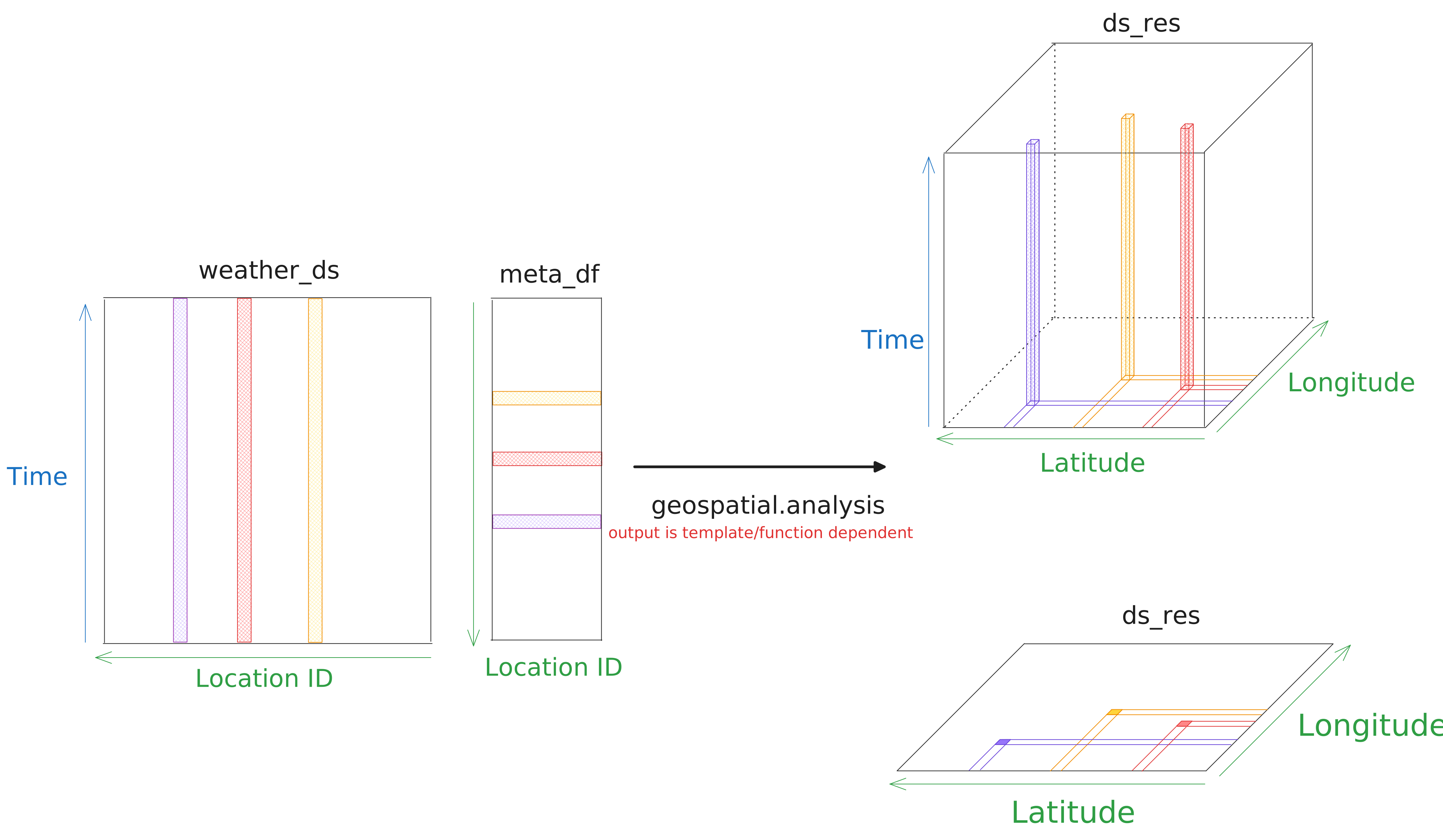
These datasets are multidimensional, with time and location as coordinates. These data come from NSRDB and PVGIS and can commonly be expressed in two ways.
three dimensions as a cube with coordinates
time,latitude, andlongitude.two dimensions as a sheet with coordinates
time, andlocation id(often represented as gid). Gid is a geospatial id, these are problematic and largely meaningless, see Issues with Gids.
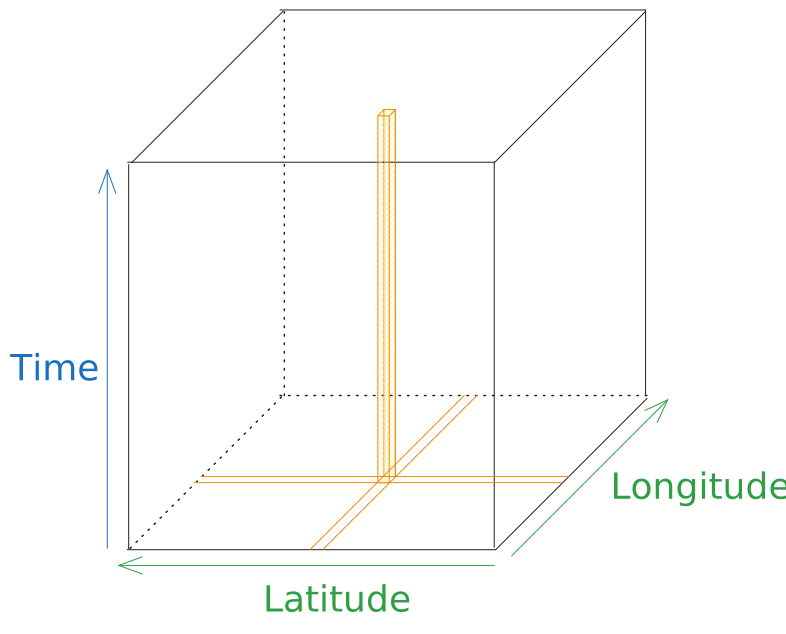
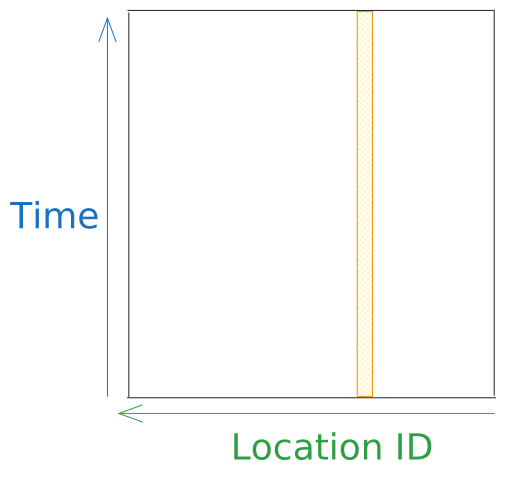
The orange 3d shape and 2d band represent a single location’s data, in the corresponding representation. This can be weather and solar radiation or other calculated results.
Geospatial Analysis#
To develop some intuition about what geospatial.analysis is doing lets examine the docstring. It says “applies a function to each gid of a weather dataset”.
This is a very simple message but it is not clear how this works at a cursory look. This is a powerful paradigm.
The most consequential part of the function is the mapping from the inputs to the output. The input and outputs are multi-dimensional and have a different number of dimensions.
The specific function applied is not relevant at this point, it does change the data-variable results in the multi-dimensional output but this is a different aspect of the analysis function. This is explained in Geospatial Templates
- pvdeg.geospatial.analysis(weather_ds: Dataset, meta_df: DataFrame, func: Callable, template: Dataset = None, preserve_gid_dim: bool = False, compute: bool = True, **func_kwargs) Dataset | Delayed[source]#
Applies a function to each gid of a weather dataset. analysis will attempt to create a template using geospatial.auto_template. If this process fails you will have to provide a geospatial template to the template argument.
analysis will attempt to create a template using geospatial.auto_template. If this process fails you will have to provide a geospatial template to the template argument.
ValueError: <function-name> cannot be autotemplated. create a template manually with geospatial.output_template
- Parameters:
weather_ds (xarray.Dataset) – Dataset containing weather data for a block of gids.
meta_df (pandas.DataFrame) – DataFrame containing meta data for a block of gids.
func (function) – Function to apply to weather data.
template (xarray.Dataset) – Template for output data.
preserve_gid_dim (bool, optional) – Expert setting. If True, preserves the ‘gid’ dimension and prevents expansion to latitude/longitude coordinates. Other dimensions such as time and distance are unaffected. Default is False.
compute (bool, optional) – Expert setting. If False, builds lazy computation graph without execution. This is useful for building into larger dask pipelines. Default is True: Values will be computed when this function is called.
func_kwargs (dict) – Keyword arguments to pass to func.
- Returns:
ds_res (xarray.Dataset | dask.delayed.Delayed) – Dataset with results for a block of gids.
Multi-dimensional inputs#
weather_dsis anxarray.Datasetwith coordinates/dimensions oftimeandgid.meta_dfis apandas.DataFrameconsisting of a row of data, extracting a single row yeilds a dictionary with metadata attributes for the specific location.
Looking at weather_ds, we generally want to get one of the tall rectangles shown in the figure. To do this we only need to index by gid.
This will get a “slice” that contains all of the weather data for that location for the length of the dataset (usually 1 year).
This slice is roughly equivalent to the weather pandas.DataFrame taken by pvdeg functions called weather_df.
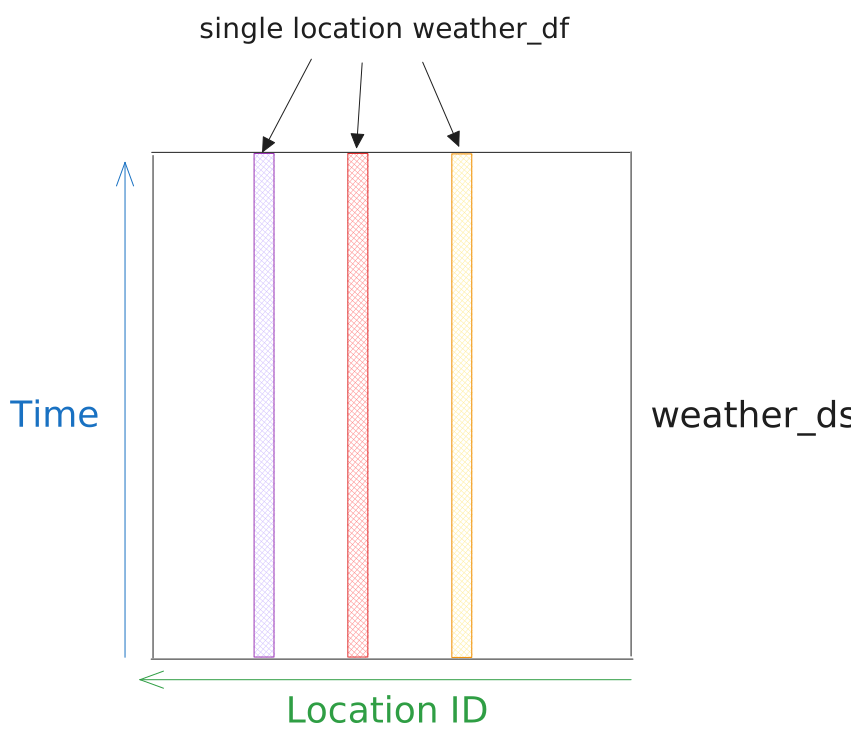
Looking at meta_df, we want one of the wide rectangles shown in the figure. The dataframe is indexed by gid so we only need to index by a single gid.
This will get a “row” that contains the gid’s meta data, such as latitude, longitude, time zone, and elevation/altitude.
This can be unpacked to the standard python dictionary (dict) taken by pvdeg functions called meta_dict.
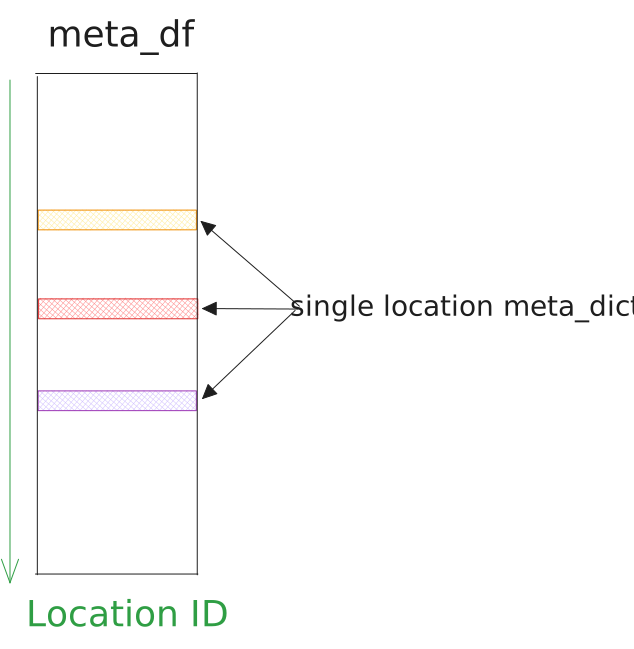
In this context, gids serve purely as indexes, gid a in weather_ds coresponds to index a in meta_df. No other information can be reliabily derived from gids.
Multi-dimensional output#
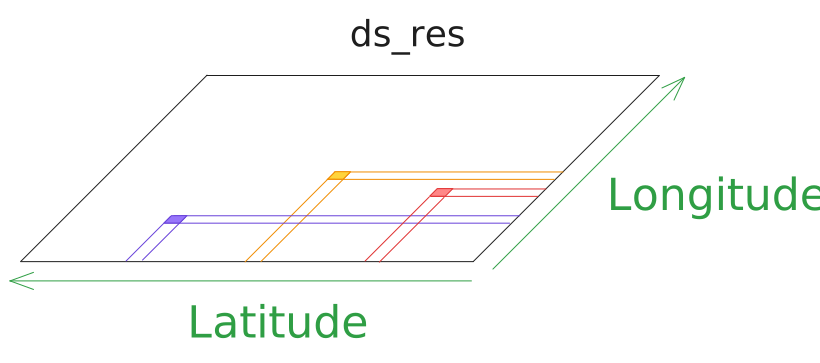
ds_resis axarray.Datasetwith coordinates/dimensions oftime,latitude, andlongitudeor simplylatitudeandlongitudeas shown below.
Notice, ds_res is a multi-dimensional result similar to the inputs but it’s shape can vary. The two standard appearances of ds_res are shown stacked on the right side of the figure below.
The shape ds_res takes is determined by the provided function and template, func and template respectively. Oftentimes, template is not required because pvdeg
can automatically generate simple templates for commonly used builtin functions.
When a function returns a timeseries result then the result will look like the cube version of ds_res with a time axis shown below.
If the function returns single numeric results such as averages of a timeseries value then there is no need for a time axis. So the result will look like the plane version of ds_res shown below.
For more on this see Geospatial Templates.
Geospatial Templates#
Using multi-dimensional labeled arrays (Xarray) we are able to run calculations using meteorological data across many points at once. This process has been parallelized using dask and xarray. Both of these packages can be run locally or on cloud HPC environments.
This presents a new issue, our models produce outputs in many different shapes and sizes. We can have single numerical results, multiple numeric results or a timeseries of numeric results at each location. To parallelize this process, we cannot wait until runtime to know what shape to store the outputs in. This is where the need for templates arises.
Previously, pvdeg.geospatial provided minimal templates and forced users to create their own for each function they wanted to use in a geospatial calculation. This is still an option via geospatial.output_template.
But many pvdeg functions do not require a template for geospatial analysis.
Auto-templating: allows users to skip creating templates for most pvdeg functions.
It is integrated into geospatial.analysis. If a function is defined with the @decorators.geospatial_quick_shape decorator in the source code, we can call geospatial.analysis without providing a template.
The function responsible for this is called geospatial.auto_template and is exposed publicly to create templates outside of geospatial.analysis.
If a function cannot be auto-templated, both geospatial.analysis and geospatial.auto_template will raise the following error.
"<function name> cannot be autotemplated. create a template manually"
Auto-templating Example#
The code below shows how to use auto-templating on a function implicitly. We simply call geospatial.analysis on a function that can be auto-templated and geospatial.analysis does the work for us.
Note: we do not need to provide a template to “analysis” if the function can be auto-templated
geo_res = pvdeg.geospatial.analysis(
    weather_ds = geo_weather,
    meta_df = geo_meta,
    func = pvdeg.design.edge_seal_width,
)
The code below shows the auto-templating process as the section above but this time we will explicitly call geospatial.auto_template and pass the generated template to geospatial.analysis.
The approach above is more direct and thus preferable.
edge_seal_template = pvdeg.geospatial.auto_template(
    func=pvdeg.design.edge_seal_width,
    ds_gids=geo_weather
)

geo_res = pvdeg.geospatial.analysis(
    weather_ds = geo_weather,
    meta_df = geo_meta,
    func = pvdeg.design.edge_seal_width,
    template = edge_seal_template,
)
Manual Templating Example I#
Creating manual templates is one of the most complicated parts of pvdeg. We will use geospatial.output_template to tell pvdeg how to go from the multi-dimensional inputs to a multi-dimensional output.
We have do to this because the dimensions are chaning. Refer to the sketch in Multi-dimensional output.
Lets examine some functions, comprehensive examples are the best way to illustrate this process.
We will start by creating templates for functions that support auto-templating. If you run the code below or use the auto-templating approches shown above, the result will be identical.
A simple function that has auto-templating is pvdeg.standards.standoff. The docstring is shown below.
- pvdeg.standards.standoff(weather_df: DataFrame = None, meta: dict = None, weather_kwarg: dict = None, tilt: float | int | str = None, azimuth: float | int = None, sky_model: str = 'isotropic', temp_model: str = 'sapm', conf_0: str = 'insulated_back_glass_polymer', conf_inf: str = 'open_rack_glass_polymer', conf_0_kwarg={}, conf_inf_kwarg={}, T98: float = 70, x_0: float = 6.5, wind_factor: float = 0.33, irradiance_kwarg={}, tracker_irradiance_kwarg={}, model_kwarg={}) DataFrame[source]#
Calculate a minimum standoff distance for roof mounded PV systems.
Will default to horizontal tilt. If the azimuth is not provided, it will use equator facing. You can use customized temperature models for the building integrated and the rack mounted configuration, but it will still assume an exponential decay.
- Parameters:
weather_df (pd.DataFrame) – Weather data for a single location.
meta (pd.DataFrame) – Meta data for a single location.
weather_kwarg (dict) – other variables needed to access a particular weather dataset.
tilt (float, optional) – Tilt angle of rack mounted PV system relative to horizontal. [°] If single-axis tracker mounted, specify keyword ‘single_axis’
azimuth (float, optional) – Azimuth angle of PV system relative to north. [°]
sky_model (str, optional) – Options: ‘isotropic’, ‘klucher’, ‘haydavies’, ‘reindl’, ‘king’, ‘perez’.
temp_model (str, optional) – Performs the calculations for the cell temperature. Options: ‘sapm_cell’,`’sapm_module’,’pvsyst_cell’,’faiman’,’faiman_rad’, `’ross’,`’noct_sam’, `’fuentes’, ‘generic_linear’. Note: we cannot simply drop in pvsyst using conf_0=insulated and conf_inf=freestanding. This will yield erroneous results as these configurtions represent different cases. Must provide equivalent conf_0_kwarg and conf_inf_kwarg between temperature models.
conf_0 (str, optional) – Model for the high temperature module on the exponential decay curve. Default: ‘insulated_back_glass_polymer’
conf_inf (str, optional) – Model for the lowest temperature module on the exponential decay curve. Default: ‘open_rack_glass_polymer’
conf_0_kwarg (dict, optional) – keyword arguments for the high tempeature module on the exponential decay curve. Use for temperature models other than
sapmmodel arguments representing an ‘insulated_back_glass_polymer’ module.conf_inf_kwarg (dict, optional) – keyword arguments for the lowest tempeature module on the exponential decay curve. Use for temperature models other than
sapmmodel arguments representing an ‘open_rack_glass_polymer’ module.x_0 (float, optional) – Thermal decay constant (cm), [Kempe, PVSC Proceedings 2023]
wind_factor (float, optional) – Wind speed correction exponent to account for different wind speed measurement heights between weather database (e.g. NSRDB) and the tempeature model (e.g. SAPM). The NSRDB provides calculations at 2 m (i.e module height) but SAPM uses a 10m height. It is recommended that a power-law relationship between height and wind speed of 0.33 be used*. This results in a wind speed that is 1.7 times higher. It is acknowledged that this can vary significantly.
irradiance_kwarg ((dict, optional)) – keyword argument dictionary used for the poa irradiance caluation. options:
sol_position,tilt,azimuth,sky_model. Seepvdeg.spectral.poa_irradiance. Used in place of dedicated arguments in the case of a top down scenario method call.model_kwarg (dict, optional) – dictionary to provide to the temperature model, see temperature.temperature for more information
Rabbani (R.)
Zeeshan (M.)
for ("Exploring the suitability of MERRA-2 reanalysis data)
estimation (wind energy)
potential (analysis of wind characteristics and energy)
Pakistan" (assessment for selected sites in)
1240-1251. (Renewable Energy 154 (2020))
- Returns:
x (float [cm]) – Minimum installation distance in centimeter per IEC TS 63126 when the default settings are used. Effective gap “x” for the lower limit for Level 1 or Level 0 modules (IEC TS 63216)
T98_0 (float [°C]) – This is the 98ᵗʰ percential temperature of a theoretical module with no standoff.
T98_inf (float [°C]) – This is the 98ᵗʰ percential temperature of a theoretical rack mounted module.
References
M. Kempe, et al. Close Roof Mounted System Temperature Estimation for Compliance to IEC TS 63126, PVSC Proceedings 2023
We can see that this will return single numeric outputs for various aspects of standoff height calculation for each location. We want the output to rely only on the input location.
This is identified with an index, gid. Since we have single numeric outputs, we do not want a time dimension. Borrowing from above, a simple sketch of the analysis output should look like the following.
The crux of this process is defining the shapes dictionary. As presented above, we only care about the gid axis on the input so the process for creating a template and running the analysis with it will be as follows.
The keys in the dictionary are named after the return values of the desired function. See the docstring for evidence of this. The values is a tuple of the dimensions that we map to in the output.
shapes = {
    "x": ("gid",),
    "T98_inf": ("gid",),
    "T98_0": ("gid",),
}
Note: the tuples appear with a comma after the string, such that (“gid”,) NOT (“gid”). This is because python will interpret the string as an group of characters to unpack if we do not enforce the tuple requirement. Adding a comma forces python to interpret the parenthesis as a tuple
Next, we will create a template using this shapes dictionary and the weather_ds. The parameters may be misleadly named as ds_gids but this is the same as weather_ds in geospatial.analysis.
geo_weather and geo_meta are placeholders for the geospatial weather and metadata that we would generally have in this scenario. It is not possible to generate an output template without providing the
geospatial weather data beacause the function needs to know how many entries it needs to make along the gid axis in this case.
standoff_template = pvdeg.geospatial.output_template(
    ds_gids=geo_weather, # geospatial xarray dataset
    shapes=shapes, # output shapes defined above
)

geo_res = pvdeg.geospatial.analysis(
    weather_ds = geo_weather, # geospatial xarray dataset
    meta_df = geo_meta, # geospatial metadata dataframe
    func = pvdeg.standards.standoff,
    template = standoff_template # template created in this example
)
Manual Templating Example II#
Another function we can look at that supports auto-templating is pvdeg.humidity.module. This calculates module humidity parameters over a timeseries. This is where we diverge from the previous example.
Inspect the docstring below and look at the return types, notice this will be a timeseries result.
- pvdeg.humidity.module(weather_df=None, meta=None, poa=None, temp_module=None, tilt=None, azimuth=180, sky_model='isotropic', temp_model='sapm', conf='open_rack_glass_glass', wind_factor=0.33, Po_b=None, Ea_p_b=None, backsheet_thickness=None, So_e=None, Ea_s_e=None, Ea_d_e=None, back_encap_thickness=None, backsheet='W017', encapsulant='W001', **weather_kwargs)[source]#
Calculate the Relative Humidity of solar module backsheet from timeseries data.
- Parameters:
weather_df (pd.DataFrame) – Weather data for a single location.
meta (pd.DataFrame) – Meta data for a single location.
poa (pd.Series, optional) – Plane of array irradiance [W/m²]. If not provided, it will be calculated
temp_module (pd.Series, optional) – Module temperature [°C]. If not provided, it will be calculated.
tilt (float, optional) – Tilt angle of PV system relative to horizontal.
azimuth (float, optional) – Azimuth angle of PV system relative to north.
sky_model (str, optional) – Options: ‘isotropic’, ‘klucher’, ‘haydavies’, ‘reindl’, ‘king’, ‘perez’.
temp_model (str, optional) – Options: ‘sapm’, ‘pvsyst’, ‘faiman’, ‘sandia’.
wind_factor (float, optional) – Wind speed correction exponent to account for different wind speed measurement heights between weather database (e.g. NSRDB) and the tempeature model (e.g. SAPM). The NSRDB provides calculations at 2 m (i.e module height) but SAPM uses a 10m height. It is recommended that a power-law relationship between height and wind speed of 0.33 be used*. This results in a wind speed that is 1.7 times higher. It is acknowledged that this can vary significantly.
Po_b (float) – Water permeation rate prefactor [g·mm/m²/day]. The suggested value for PET W17 is Po = 1319534666.90318 [g·mm/m²/day].
Ea_p_b (float) – Backsheet permeation activation energy [kJ/mol].
backsheet_thickness (float) – Thickness of the backsheet [mm]. The suggested value for a PET backsheet is 0.3mm.
So_e (float) – Encapsulant solubility prefactor in [g/cm³]
Ea_s_e (float) – Encapsulant solubility activation energy in [kJ/mol]
Ea_d_e (float) – Encapsulant diffusivity activation energy in [kJ/mol]
back_encap_thickness (float) – Thickness of the backside encapsulant [mm]. The suggested value for EVA encapsulant is 0.46mm.
backsheet (str) – This is the code number for the backsheet. The default is PET ‘W017’.
encapsulant (str) – This is the code number for the encapsulant. The default is EVA ‘W001’.
**weather_kwargs (keyword arguments) – Additional keyword arguments passed to the weather data reader.
- Returns:
rh_surface_outside (float pandas dataframe) – relative humidity of the PV module surface as a time-series,
rh_front_encap (float pandas dataframe) – relative humidity of the PV frontside encapsulant as a time-series,
rh_back_encap (float pandas dataframe) – relative humidity of the PV backside encapsulant as a time-series,
Ce_back_encap (float pandas dataframe) – concentration of water in the PV backside encapsulant as a time-series,
rh_backsheet (float pandas dataframe) – relative humidity of the PV backsheet as a time-series
Now we will define the shapes dictionary, the output will be a mapping from the input dimensions of gid and time so both of these will appear in our shapes value tuples.
Thus our output will have a time axis and show look like the ds_res as a cube with the time axis as shown below.
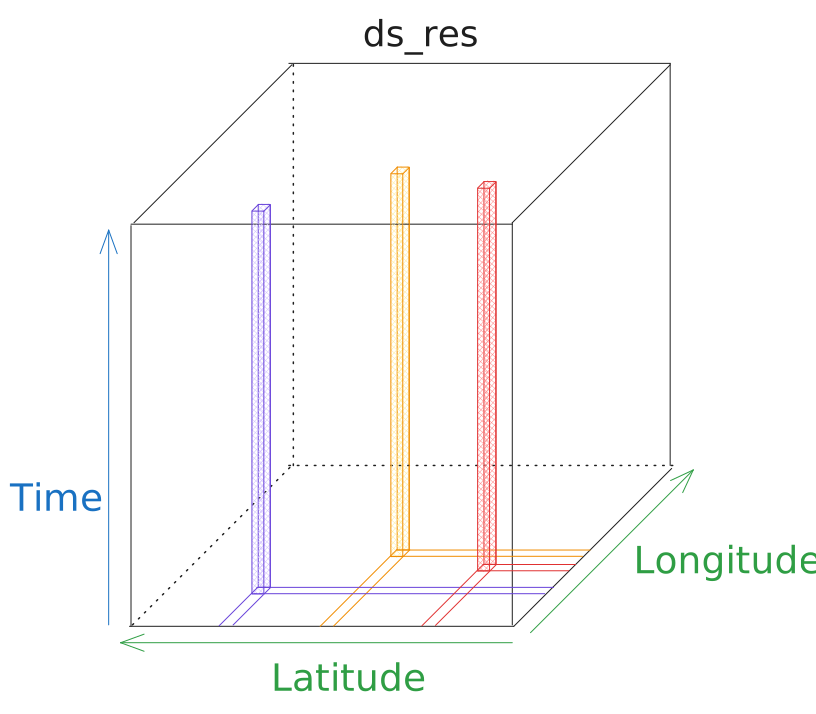
This is an oversimplification but each column in the cube represets a pandas.DataFrame result with columns represeting each return value and a pd.DatetimeIndex. The columns will be named as follows.
“RH_surface_outside”
“RH_front_encap”
“RH_back_encap”
“RH_backsheet”
The docstring does not give us that much useful information about the results so we can run it on a single location and get the column names or dict keys then these will become our shape names.
This is not ideal but simply running at a single site before a geospatial calculation can yield useful context. geospatial.analysis error messages are oftentimes clear.
This is a result of dask, lazy-computing and confusing higher dimensional datasets.
shapes = {
    "RH_surface_outside": ("gid", "time"),
    "RH_front_encap": ("gid", "time"),
    "RH_back_encap": ("gid", "time"),
    "RH_backsheet": ("gid", "time"),
}
This shapes dictionary is valid, so we can pass it to geospatial.output_template as in the above example and run the analysis.
module_humidity_template = pvdeg.geospatial.output_template(
    ds_gids=geo_weather, # geospatial xarray dataset
    shapes=shapes, # output shapes defined above
)

geo_res = pvdeg.geospatial.analysis(
    weather_ds = geo_weather, # geospatial xarray dataset
    meta_df = geo_meta, # geospatial metadata dataframe
    func = pvdeg.module.humidity,
    template =  module_humidity_template # template created in this example
)
Manual Templating Example III#
Last, lets look at another example. This one will be abridged as it covers the same topic as Manual Templating Example II.
This time consider pvdeg.letid.calc_letid_outdoors. Lets inspect the docstring to see what the return values look like.
- pvdeg.letid.calc_letid_outdoors(tau_0, tau_deg, wafer_thickness, s_rear, na_0, nb_0, nc_0, weather_df, meta, mechanism_params, generation_df=None, d_base=27, cell_area=243, tilt=None, azimuth=180, module_parameters=None, inverter_parameters=None, temp_model='sapm', temperature_model_parameters='open_rack_glass_polymer')[source]#
Models outdoor LETID progression of a device.
- Parameters:
tau_0 (numeric) – Initial bulk lifetime [μs]
tau_deg (numeric) – Fully degraded bulk lifetime [μs]
wafer_thickness (numeric) – Wafer thickness [μm]
s_rear (numeric) – Rear surface recombination velocity [cm/s]
na_0 (numeric) – Initial percentage of defects in state A [%]
nb_0 (numeric) – Initial percentage of defects in state B [%]
nc_0 (numeric) – Initial percentage of defects in state C [%]
weather_df (pandas DataFrame) –
Makes use of pvlib ModelChain.run_model. Similar to pvlib, column names MUST include: -
'dni'-'ghi'-'dhi'Optional columns are:
'temp_air''cell_temperature''module_temperature''wind_speed''albedo'
meta (dict) – dict of location information for builidng a pvlib.Location object, e.g. from PSM3 data accessed via pvdeg.weather.read(file, ‘csv’)
mechanism_params (str) – Dictionary of mechanism parameters. These are typically taken from literature studies of transtions in the 3-state model. They allow for calculation the excess carrier density of literature experiments (dn_lit). Parameters are coded in ‘MECHANISM_PARAMS’ dict.
generation_df (pandas DataFrame or None) – Dataframe of an optical generation profile for a solar cell used to calculate current collection. If None, loads default generation profile from
'PVL_GenProfile.xlsx'. – If not None, column names must include: -
'Generation (cm-3s-1)'-'Depth (μm)'TODO: improve this.d_base (numeric, default 27) – Minority carrier diffusivity of the base of the solar cell [cm²/Vs].
cell_area (numeric, default 239) – Cell area [cm²]. 239 cm² is roughly the area of a 156x156mm pseudosquare “M0” wafer
tilt (numeric or None, default None) – Tilt angle of system. If None, defaults to location latitude
azimuth (numeric, default 180) – Azimuth angle of the syste. Default is 180, i.e., south-facing.
module_parameters (dict or None, default None) – pvlib module parameters. see pvlib documentation for details. Note that this model requires full DC power results, so requires either the CEC or SAPM model, (i.e., not PVWatts). If None, defaults to “Jinko_Solar_Co___Ltd_JKM260P_60” from the CEC module database.
inverter_parameters (dict or None, default None) – pvlib inverter parameters. see pvlib documentation for details. .
temp_model (str, default "sapm") – pvlib temperature model, either “sapm” or “pvsyst”. See pvlib.temperature.
temperature_model_parameters (str, default "open_rack_glass_polymer") – Temperature model parameters as required by the selected model in pvlib.temperature
- Returns:
timesteps (pandas DataFrame) – Datafame containing defect state percentages, lifetime, and device electrical parameters
See also
pvlib.modelchain.ModelChain.run_model,pvdeg.weather.read,pvlib.pvsystem.PVSystem,pvlib.temperature
Once again we can see that the output shapes are obscured. It just says we are returning a pandas.DataFrame called timesteps. This is not helpful.
We will have to run the function at a single location to see what the column names are.
Assuming we ran pvdeg.letid.calc_letid_outdoors at a single site we would see that the DataFrame columns are named as follows.
“Temperature”
“Injection”
“NA”
“NB”
“NC”
“tau”
“Jsc”
“Voc”
“Isc”
“FF”
“Pmp”
“Pmp_norm”
Because we know the function returns a pandas.DataFrame with a time index, all of the columns will have entries at each timestep. This means that we need to include, the time dimension in our output.
The shapes dictionary will look like the following. For visual assistance, refer to the cube shaped ds_res sketch.
shapes = {
    "Temperature": ("gid", "time"),
    "Injection": ("gid", "time"),
    "NA": ("gid", "time"),
    "NB": ("gid", "time"),
    "NC": ("gid", "time"),
    "tau": ("gid", "time"),
    "Jsc": ("gid", "time"),
    "Voc": ("gid", "time"),
    "Isc": ("gid", "time"),
    "FF": ("gid", "time"),
    "Pmp": ("gid", "time"),
    "Pmp_norm": ("gid", "time"),
}
Now we have defined shapes, as above we can simply pass it to geospatial.output_template and use the generated template in our analysis.
letid_template = pvdeg.geospatial.output_template(
    ds_gids=geo_weather, # geospatial xarray dataset
    shapes=shapes, # output shapes defined above
)

geo_res = pvdeg.geospatial.analysis(
    weather_ds = geo_weather, # geospatial xarray dataset
    meta_df = geo_meta, # geospatial metadata dataframe
    func = pvdeg.letid.calc_letid_outdoors
    template =  letid_template # template created in this example
)