
Meterological Data#
PVDeg seeks to automate the tedious parts of degradation analysis by providing simple tools to work with weather data.
pvdeg.weather.get seeks to unify this functionality into a simple function.
The PVDeg tutorials and examples use two datasets, NSRDB and PVGIS. These are serially complete data including meteorological data and solar radiation (irradiance) measurements. The methodology for these datasets varies but both are gridded geospatial datasets with similar attributes.
NSRDB#
The NSRDB is produced by NREL and combines multiple datasets but we are most concerned with Physical Solar Model 3 (PSM3). This data was generated using satellite data from multiple channels to derive cloud and aerosol properties, then fed into a radiative transfer model. Learn more about the NSRDB here.
The NSRDB is free to use but requires an api-key and email. See NSRDB API Key for more information. For our purposes, the api is limited to 1000 requests per day, although you can request a batch download via email with a significantly higher rate limit (not recommended for PVDeg).
Flowchart showing the dataflow from satellite to solar radiation measurement.
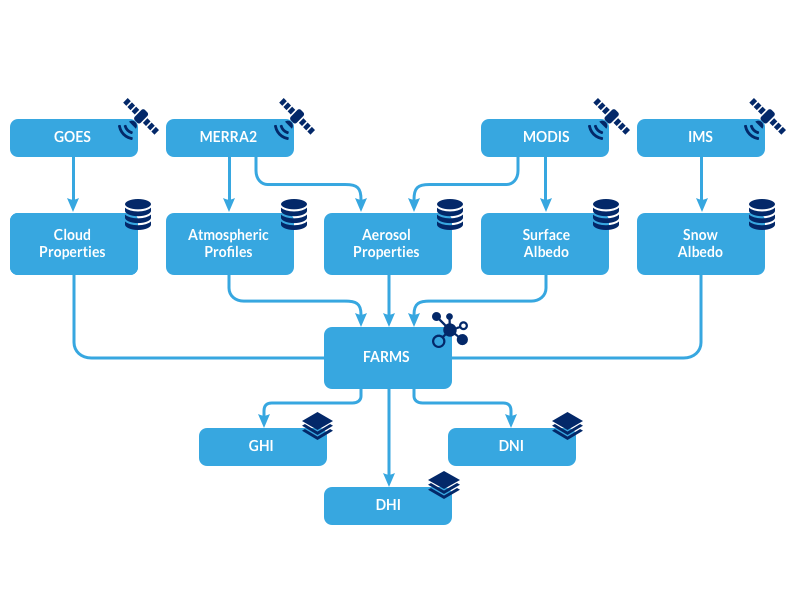
https://nsrdb.nlr.gov/about/what-is-the-nsrdb
NSRDB data are separated by satellite/model source. Each dataset is shown below, much of the PVDeg project uses the Americas data.

PVGIS#
PVGIS is the European counterpart of the NSRDB. The data was sourced similarly. With PVGIS we are most concerned with a typical meteorological year. PVDeg uses utilities built in pvlib to access the data.
PVGIS is free to use and does NOT require an api-key. It has a rate limit of 30 requests per second and covers a much larger range of longitudes and latitudes.
The PVDeg tutorials and examples use two datasets, NSRDB and PVGIS. These are serially complete data including meteorological data and solar radiation (irradiance) measurements. The methodology for these datasets varies but both are gridded geospatial datasets with similar attributes.
PVGIS data are separated by satellite/model source. Visit the links below for more information about the datasets.
Issues with Gids#
“Gids”, plural or “gid” singular refer to a geospatial id. This is where the simplicity ends because gids are largely meaningless.
When using pvdeg.weather.get to grab PVGIS data as follows. We will get a gid back but it will always be the same because PVGIS gids are meaningless. The gids created during this process only serve as indexes.
weather_df, meta_df = pvdeg.weather.get(
    database="PVGIS",
    id = (<lat>, <lon>),
)
When using the NSRDB PSM3 dataset, gids are unique only to their satellite. Because of this, gids can only be treated as unique if we can guarantee only one satellite source is being utilized. This is possible but causes headaches.
weather_df, meta_df = pvdeg.weather.get(
    database="PSM3",
    id = (<lat>, <lon>),
    email = <myemail>,
    api_key = <api_key>,
)
Takeaway: gids are not unique or necessarily meaningful, be careful when using them. Duplicate gids can exist in geospatial data and will be loaded using Xarray without raising an error.
Accelerated Downloads#
PVDeg provides tools for the accelerated downloading of meteorological data outside of HPC environments. This is particularly useul for PVGIS which allows us to download up to
30 locations per second of tmy data. Due to the single-threaded nature of Python, we are traditionally limited to 1 request at a time. Often, PVGIS takes 2-3 seconds per location.
This cumulates in massive download times for large datasets. We can use Dask for parallelization to greatly accelerate this process and approach the 30 requests per second rate limit.
We can see that abstract potential speedup offered by parallelization. It is easy to utilize this functionality as provided by pvdeg.weather.weather_distributed.
- pvdeg.weather.weather_distributed(database: str, coords: list[tuple], api_key: str = '', email: str = '')[source]
Grab weather using pvgis for all locations using dask for parallelization.
You must create a dask client with multiple processes before calling this function, otherwise results will not be properly calculated.
PVGIS supports up to 30 requests per second so your dask client should not have more than $x$ workers/threads that would put you over this limit.
NSRDB (including database=”PSM4”) is rate limited and your key will face restrictions after making too many requests. See rates [here](https://developer.nlr.gov/docs/solar/nsrdb/guide/).
- Parameters:
database ((str)) – ‘PVGIS’ or ‘PSM4’
coords (list[tuple]) –
list of tuples containing (latitude, longitude) coordinates
coords_example = [
    (49.95, 1.5),
    (51.95, -9.5),
    (51.95, -8.5),
    (51.95, -4.5),
    (51.95, -3.5)]
api_key (str) – Only required when making NSRDB requests using “PSM4”. [NSRDB developer API key](https://developer.nlr.gov/signup/)
email (str) – Only required when making NSRDB requests using “PSM4”. [NSRDB developer account email associated with api_key](https://developer.nlr.gov/signup/)
- Returns:
weather_ds (xr.Dataset) – Weather data for all locations requested in an xarray.Dataset using a dask array backend.
meta_df (pd.DataFrame) – Pandas DataFrame containing metadata for all requested locations. Each row maps to a single entry in the weather_ds.
gids_failed (list) – list of index failed coordinates in input coords